Who does what in the Cardmarket workflow
TCG PowerTools is a listing tool for sellers onCardmarket. It accepts inventory lists as CSV files and manages your listings from there. TCG Actana starts one step earlier: the desktop app matches your card images to the catalogue.
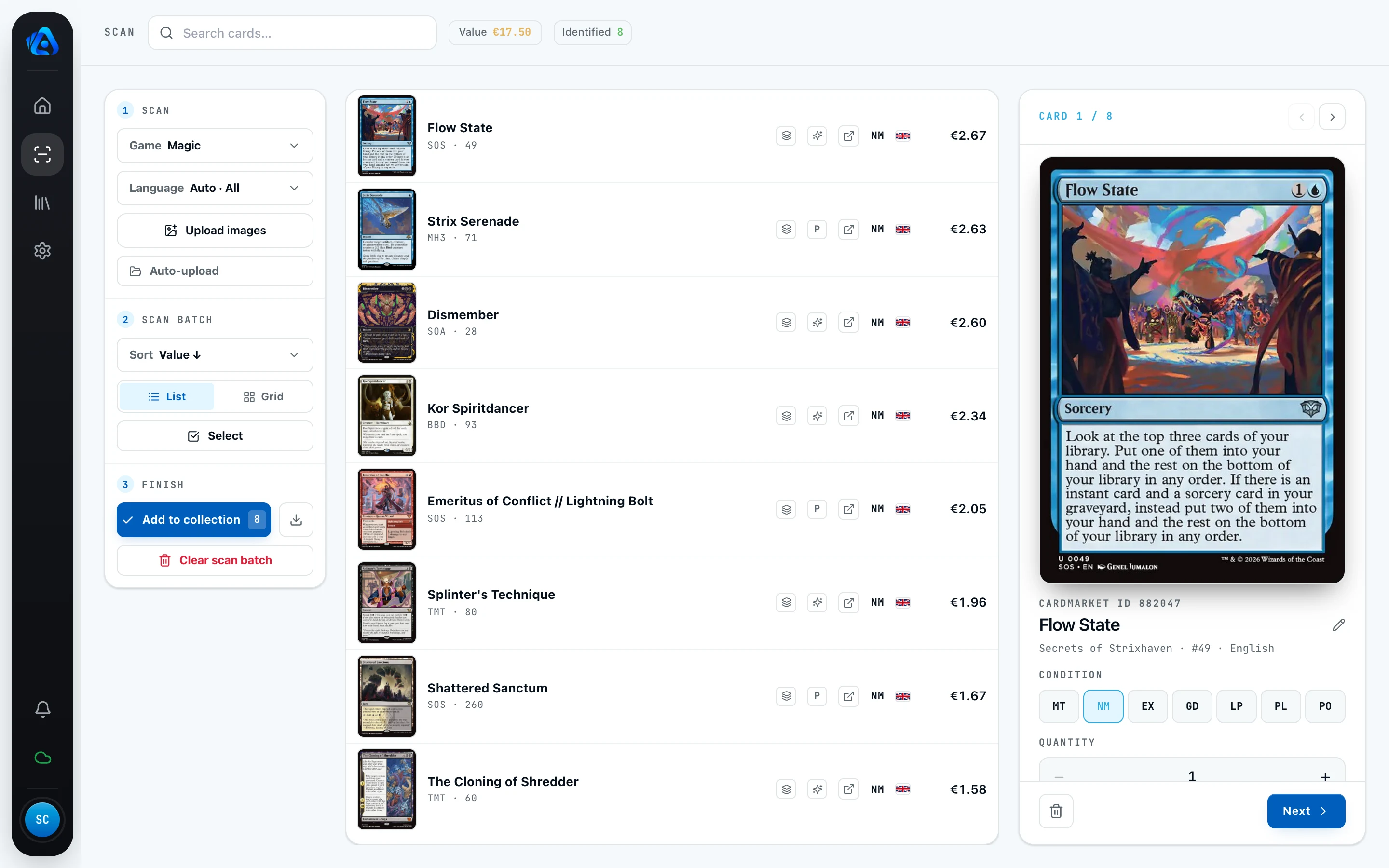
Actana takes your cards in as image files through file selection, drag and drop, or a watched scanner folder. The app tries to match the card, set, collector number, and language automatically. Matches classified as uncertain or ambiguous go to a review view for you to confirm. Condition, finish, and quantity are recorded per copy. The export then turns all of it into a CSV in the TCG PowerTools import format.
One thing to be clear about: Actana uploads nothing to Cardmarket. Importing the file into TCG PowerTools is your next step, and prices and listings stay under your control there.

What the TCG PowerTools import actually requires
According to the official knowledge base, only two things are mandatory: aQuantity column plus one way to identify the card. TCG PowerTools accepts an ID column (Cardmarket ID, Scryfall ID, or TCGplayer ID) or the combination of name, collector number, and expansion.
If language or condition are missing, TCG PowerTools falls back to defaults: English and Near Mint. For a non-English inventory that default is risky, because a German card quietly becomes an English listing. Actana therefore exports the stored values explicitly. New scan entries start at NM, so review and correct that default before exporting. Cards without a clear language are omitted.
What the Actana CSV looks like
The preset is called "Cardmarket listing (TCG PowerTools)" in Actana. The files are comma-separated UTF-8 without a byte order mark. Magic deliberately uses a slim import schema to reduce mapping friction in TCG PowerTools. Pokémon and the other supported TCGs retain the additional variant columns.
| Column | Contents |
|---|---|
cardmarketId | Cardmarket product ID of the printing, where available |
quantity | number of identical copies |
name | English card name where available, otherwise the stored display name |
set | full set name where available, otherwise the set code |
cn | collector number; extended variant schema only |
condition | condition on the Cardmarket scale, MT through PO |
language | language written out in full, such as "German" |
isFirstEd | "true" for 1st Edition copies; extended variant schema only |
isReverseHolo | "true" for reverse holo copies; extended variant schema only |
isSigned | left empty by the Actana export |
price | listing price with a decimal point, such as "8.25", otherwise empty |
finishType | canonical TCG PowerTools value, such as Regular, Foil, ReverseHolo |
buyPrice | left empty by the Actana export |
comment | left empty and placed at the end of the fixed header |
location | optional; only added after comment when you assign storage locations |
The slim Magic header with one complete sample row:
cardmarketId,quantity,name,set,condition,language,isSigned,price,finishType,buyPrice,comment
12345,1,Entomb,Odyssey,NM,German,,8.25,Regular,,That is a German-language Entomb from Odyssey, Near Mint, one non-foil copy listed at 8.25 EUR. Unused fields stay empty. The extended schema for Pokémon and the other TCGs additionally contains cn, isFirstEd, andisReverseHolo. If you assign storage locations, Actana appendslocation as the final column directly after comment in both schemas.
Language, condition, quantity, and finish
Language. Actana detects the card language during the scan and exports it written out, "German" rather than "de". Cards without a clear language are skipped at export time and reported, never guessed as English.
Condition. New scan entries start at NM. Review and change that default per copy on the Cardmarket scale MT, NM, EX, GD, LP, PL, PO. The CSV carries the saved code.
Quantity. quantity is the number of identical copies in one row, meaning the same printing, condition, language, and finish.
Finish. finishType carries canonical TCG PowerTools values such as Regular, Foil, ReverseHolo, StampedHolo, ReverseCosmosHolo, MasterballHolo, or PokeballHolo. For Magic, the available finish choices depend on the variant data Actana has for that printing. One limit we state openly: foil is not detected optically, because document scanners give no reliable foil signal. You set the finish yourself.
Reverse holo. For reverse copies, Actana sets both fields together:isReverseHolo to "true" and finishType to the matching reverse value, such as ReverseHolo or ReverseCosmosHolo. The boolean marks the reverse status, while finishType preserves the specific finish category.
Price. The price is strictly tied to the finish. A foil or reverse row never receives the regular version's price as a stand-in. If no matching market value exists, the field stays empty rather than letting a foil card slip into your listings at the regular price.
One file per game
The export creates a separate CSV for each supported game represented in the export. This applies to Magic, Pokémon, One Piece, and Riftbound. The reason sits on the import side: TCG PowerTools always processes a CSV in the context of the game that is active there, and the format has no game column. Your collection in Actana can stay mixed; only the export splits it cleanly.
Common import problems
- Changed columns. TCG PowerTools requires each imported column to be assigned to the correct field. The safest route is to leave the header produced by Actana untouched and confirm the assignments before importing.
- Excel reformats the file. Opening and re-saving can switch the separator to semicolons, turn prices into decimal commas, and strip leading zeros from collector numbers. The safest route is to import the file unchanged. If you must edit it, save as "CSV UTF-8 (comma delimited)" and check the price and
cncolumns afterwards. - Price with a comma instead of a point. TCG PowerTools reads the price value literally. A cent amount like "825" becomes a listing at 825 EUR instead of 8.25 EUR, and a comma value like "8,25" does not arrive reliably. That is why Actana always writes a decimal point, "8.25".
- Missing language. Without a language value, TCG PowerTools defaults to English, which produces the wrong listing for German cards. Actana always writes the language in full and skips cards without a clear language instead of guessing. Skipped cards are reported at export time, so nothing disappears silently.
CSV export or ID converter?
There are two routes to a TCG PowerTools file here, and they solve different problems. The CSV export in the desktop app builds the file from your own scanned collection. TCG Actana is in alpha. The installer for Windows (x64) and Apple Silicon Macs is publicly available, and you create your account with an email address and password in the app. The alpha currently costs €0, but it is not a purchase or subscription and does not promise permanently free access.
If you already have a TCGplayer CSV with Product IDs, you need neither a scan nor an account. The free ID converter turns it into a TCG PowerTools compatible file with Cardmarket IDs right in your browser. Your CSV file stays in the browser; of its contents, the converter sends only the Product IDs needed for mapping to the Actana API. It expects Product IDs, not seller SKUs. Mapping coverage varies by game and is currently incomplete for Pokémon; unmatched IDs are reported separately.
In short: collection scanned in Actana, use the export in the app. TCGplayer list already at hand, use the ID converter.
To see what the Magic card scanner identifies and how to use it, read the product page. For the basics of the CSV format and the other presets, readCSV export explained.